Select Objects by Stroke Weight
Selects objects based on stroke weight conditions.
This script selects objects based on stroke weight conditions. For example, if you specify a range of 1pt to 2pt, all objects with stroke weights within that range (e.g., 1.5pt) will be selected. You can also select very thin strokes (e.g., 0.3pt or less), which helps to find lines that cannot be reproduced in print. This enables complex selections that Illustrator’s native features cannot easily achieve.
Palette description
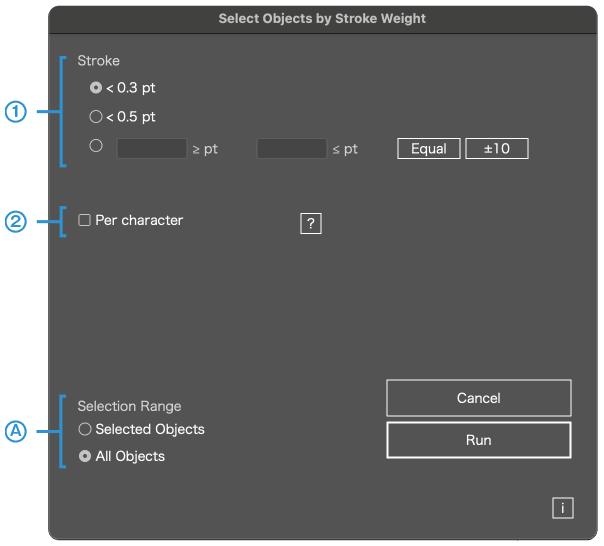
You can select objects by specifying a stroke weight range
1
Specify stroke weight range
For example, if you specify 1pt to 2pt, all objects with stroke weights in that range (e.g., 1.5pt) will be selected. You can also specify 0.3pt or 0.5pt or less to find and handle lines that cannot be reproduced in print.
Click the Match button to set the minimum and maximum to the same value. Click the ±10 button to adjust the minimum and maximum by -10% and +10%, respectively.
2
Individually check inside text objects
Inside text objects, some strokes may have been set individually. If this option is checked, each stroke will be examined separately.
A
Filter target objects
This script cannot run if locked objects exist. This is due to internal processing limitations. Please unlock objects before running.