Color Adjustment by Object
Adjust object colors in the document by a percentage.
This script allows you to increase or decrease the CMYK or RGB channel values of objects in the document by a specified percentage. For example, setting C to 110% changes a color with C=50% to 55%, and C=10% to 11%. The adjustment is directly applied to fills and strokes.
Palette Description
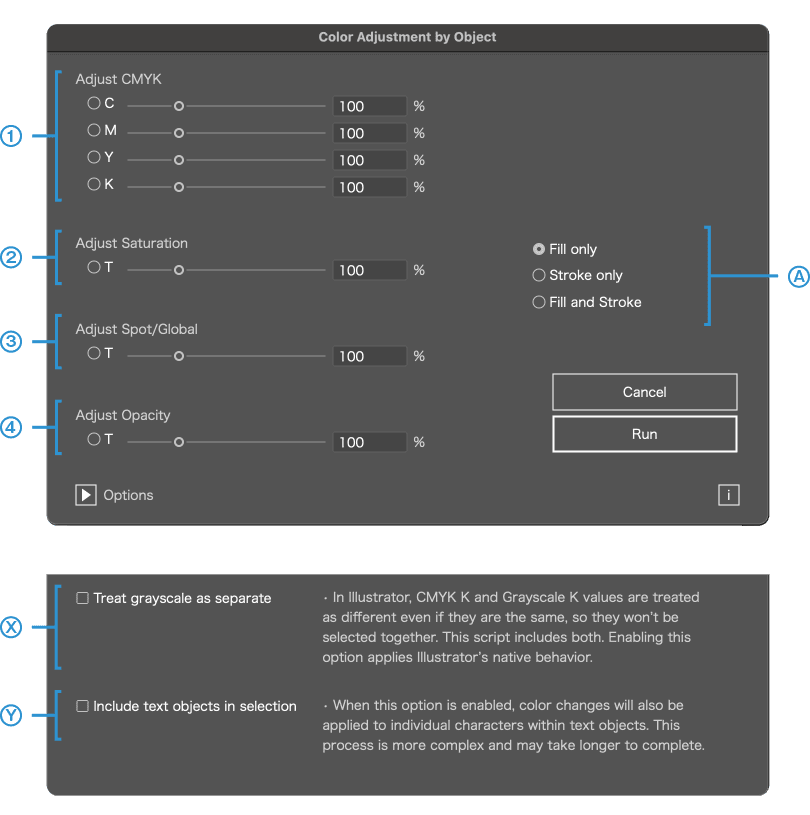
You can increase or decrease object colors and other values by percentage. Choose one of the four methods below and specify the percentage.
1
CMYK / RGB
2
Saturation
3
Spot / Global Colors
4
Opacity
A
1
CMYK / RGB
Specify a percentage adjustment for channel values. Example: setting C to 110% changes C=50% → 55%, C=10% → 11%.
2
Saturation
Adjust saturation by percentage. Increasing saturation makes colors appear more vivid.
How saturation adjustment works
Colors are converted into the HSB color space, and the S (Saturation) value is adjusted by the specified percentage. For CMYK, colors are converted to RGB first, then to HSB, and finally converted back to the original color mode. For gradients, each color stop is adjusted individually. ※ This adjustment is approximate and not intended as an exact color reproduction or simulation.
3
Spot / Global Colors
Adjust the tint by percentage. For example, a tint of 50% set to 110% becomes 55%.
4
Opacity
Adjust opacity by percentage. For example, an object with 50% opacity set to 110% becomes 55%.
A
Filter Target Objects
Options
Click ▶ to configure option settings.
X
Treat Grayscale as a Different Color
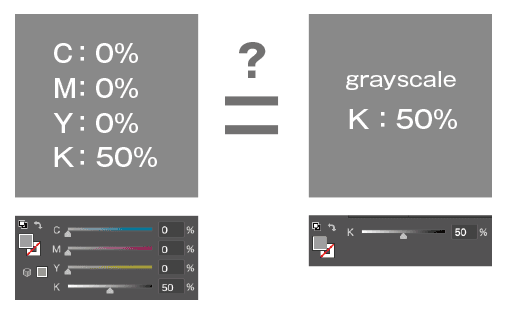
In Illustrator, even if K=50% is the same, a CMYK value (e.g., C=0 M=0 Y=0 K=50) and a Grayscale value (e.g., K=50) are treated as different and cannot be selected together. This script treats them as the same color. Enable the checkbox to mimic Illustrator's native behavior (treating them as different).
Y
Include Text in Selection
When enabled, the adjustment also applies to individual characters within text objects. Since this process is more complex, it may take longer to complete.

This script cannot be executed if there are locked objects. Please unlock them before running.