Artboards Renamer
Batch rename artboards.
When you add an artboard in Illustrator, it is automatically given a name such as 'Artboard 1 copy'. In this case, using 'Export for Screens' may cause problems because the artboard name becomes the file name. This script allows you to batch rename artboards.
Palette Description
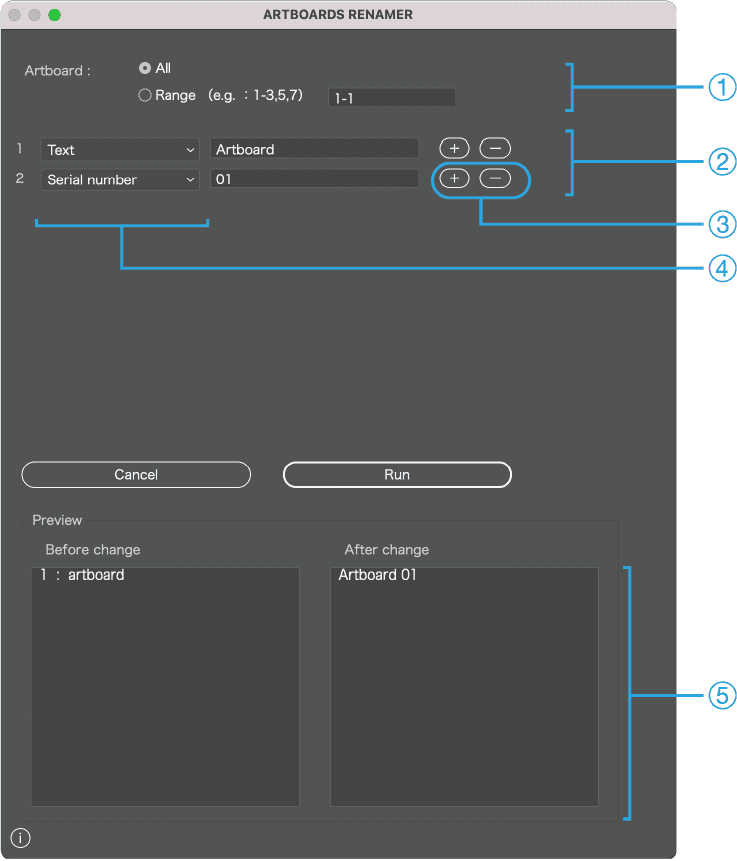
1
Specify the range of artboards to rename
2
Set the rename pattern
3
Press the (+/-) button to add or delete rename patterns
4
Rename pattern
・Text
・Selected text
・Current artboard name
・Serial number
・Serial character
・Date
・None
5
Preview before and after changes
※The renamed list can be edited
Usage
Set and combine one or multiple rename patterns. Check in preview. You can edit the list directly by clicking on the preview list. Click Run to apply renaming.
・design_01
・design_02
・design_03
・design_04
・
・
・
About rename patterns
・Text
>Set any text
・Selected text
> Selected text (see next section for details)
・Current artboard name
・Serial number
・Serial character
・Date
・None
Special rename pattern > About selected text
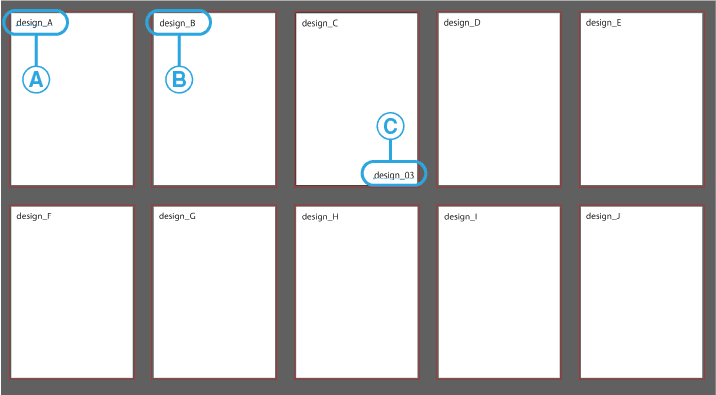
When you select text, that text will be used as the artboard name.
A
If another artboard has text in the same position as A,
B
that text will also be used as the artboard name. However, if different text is selected, that text takes precedence.
C