Adjust Text Stroke
Adjust the stroke width of text proportionally to font size to keep consistency across multiple text objects.
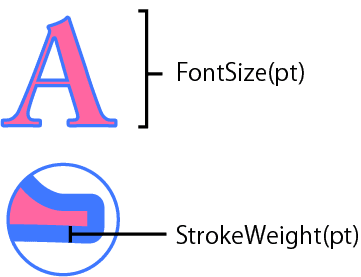
For example, if a 10pt font has a 0.1pt stroke, a 20pt font should have a 0.2pt stroke to look consistent. This script automatically adjusts the stroke width/font size ratio across selected text objects.
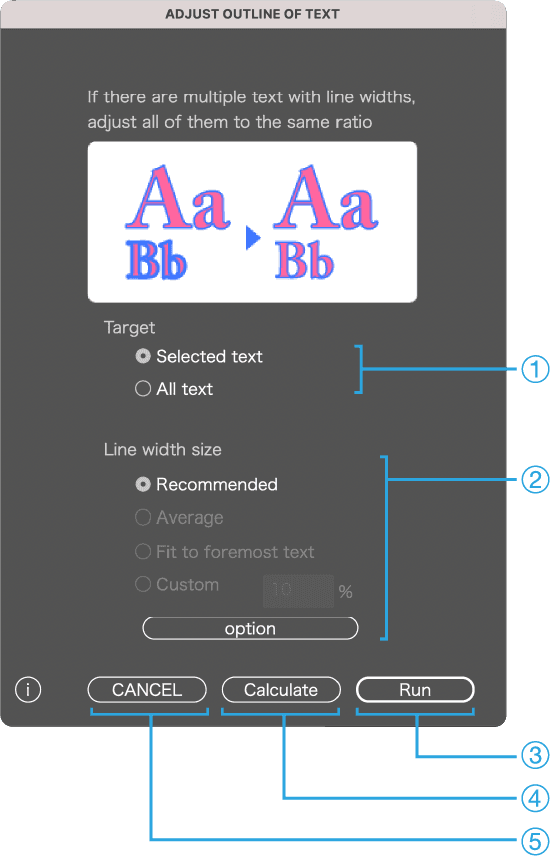
Palette Description
1
Select the target text
2
Choose how to calculate the stroke width
◯ Recommended
・Fix the stroke widths of the smallest and largest text sizes, and automatically calculate the stroke widths for the sizes in between.
◯ Average
・Use the average ratio of the selected text as the stroke width.
◯ Match frontmost text
◯ Custom
・You can enter a custom ratio. Press the [Calculate] button to display the calculation result here.
◯ OPTION
・By default, options other than [Recommended] are grayed out. Press OPTION to enable them.
3
Run
4
Calculate
Calculate the stroke width/font size ratio according to the settings above. The result will be displayed in the Custom field.
5
Cancel